|
||
Click on a thumbnail to enlarge it. Use your browser's "BACK" button to return to this review when done. |
||
 Type
of Product Type
of Product |
||
| Attachment Opener by DataViz is a utility for anyone receiving important files through e-mail. It enables users to decode, decompress, view and print files without having the original application that created the file. DataViz has long been an industry leader for file translation and compatibility software. They market a wide variety of products that aid users of computers in sharing information between different programs and platforms. For more information about their products, see their Web site: http://www.dataviz.com | ||
| User
Level |
||
| Beginning, Intermediate, and Advanced. This is a very intuitive and easy to use program. The features would appeal to a variety of users. | ||
| Features
|
||
|
||
| Review |
||
|
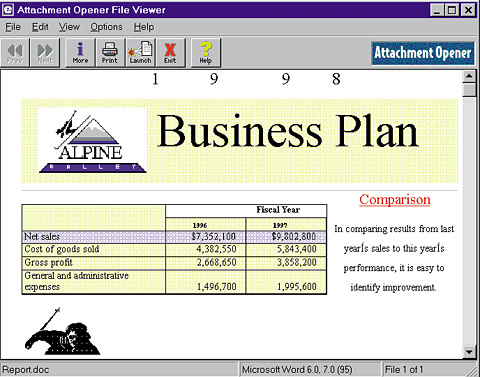
Installation. The program is very quick and easy to install. It takes almost no disk space--only 10MB--and requires only 4MB RAM. Retrieve Attachments from "Garbage Text." Have you
ever received a file via e-mail, and the attached file appeared as garbage
text at the end of the e-mail message? Attachment Opener will retrieve
your important file from the garbage. When files are sent attached to
an e-mail message, they are encoded by the mail package that is sending
the e-mail using one of several encoding Fix Problem E-mail Attachments. Have you ever been able to retrieve the attached file from your e-mail message but not could not use it? Attachment Opener will determine the format of the file, add the correct Windows extension and allow you to view or print it--even if you do not have the program that created it. Use Compressed or Encoded Files. Have you ever received one
of those pesky "MIME" e-mail attachments? Often files downloaded
from the Internet or received via e-mail are compressed or encoded in
formats such as Zip, uuEncode, MIME, etc. Attachment Opener helps you
deal with these files. You can view and print their contents. Quickly View and Print Files. Do you ever wish you could just see what's in a file quickly without opening it? Attachment Opener lets you view (and print) virtually any word processing, database, spreadsheet or graphic file--even if you don't have the program it was created in. |
||
| Personal
Comments |
||
| This is an excellent utility. DataViz makes a variety of utilities that I would not be without. | ||
| System
Requirements |
||
|
Windows 95, 98 or Windows NT 4.0 |
||
|
Graphics:
Web Spice
Web Page Editor: Macromedia Dreamweaver 2.0 Scanner: Hewlett Packard ScanJet 6250C Professional Series |
||
|
|
||
 Attachment
Opener
Attachment
Opener